A reserve for online orders
Warehouse stock never falls below the floor you set.
FOR MULTI-STORE SHOPIFY BRANDS
Allocator prepares your replenishment, size by size, store by store. You stay in control of what gets sent.
With Jordan: 20 min to walk through a proposal, then 10 min for your questions. No Shopify connection needed.
14 days of full access from installation, without choosing a plan.Choosing a plan may start billing before this access period ends.
 WarehouseALLOCATOR
Marais · Alma / M · min. 4 → 6
Rivoli → Opéra · Alma / M · 2 units
Fictional network · product demonstration
Alma shirt · M — sales are picking up. In dynamic mode, stock thresholds are recalculated daily. Your replenishment list follows the new need.
Alma shirt · M — slower sales at Rivoli, stockout risk at Opéra. If warehouse stock is insufficient, Allocator proposes a transfer while preserving the donor’s coverage.
You approve transfers before they are executed.
Manual and imported thresholds stay under your control.
01One line
FICTIONAL EXAMPLE · REPLENISHMENT LIST
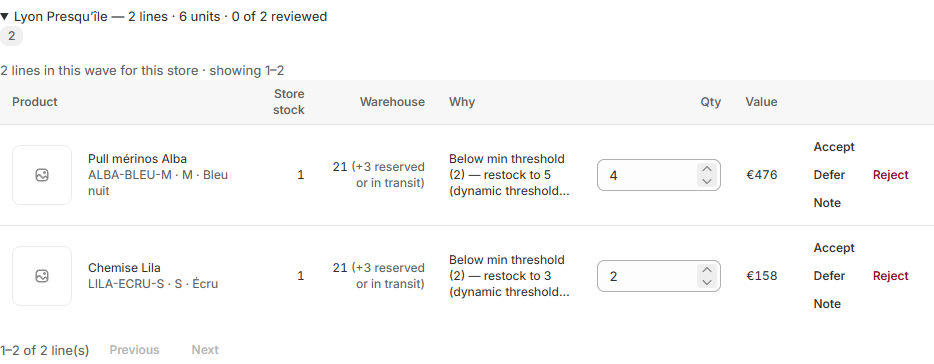
Reference, size, destination, quantity and reason on one line. You stay in control of what gets sent.
ALBA / M
Midnight blue · size M
Lyon Presqu’îleBring this size’s stock up to its target.
Alba example: 1 unit in store · target of 5 · 4 units proposed. You can edit the quantity.
Scroll the table to see the reason, quantity and actions →
02The gap
Alba sweater · availability by size
| XS | S | M | L | XL | |
|---|---|---|---|---|---|
| Paris | In stock | In stock | In stock | In stock | In stock |
| Lyon | In stock | At zero | In stock | In stock | In stock |
| Bordeaux | In stock | In stock | At zero | At zero | In stock |
| Cannes | In stock | In stock | In stock | In stock | At zero |
| Nantes | Not measured | Not measured | Not measured | Not measured | Not measured |
The gap
Size M is missing in Bordeaux while other sizes are available. This is the level at which Allocator prepares replenishment.
Missing data is never treated as zero.
03The loop
Allocator prepares the movements. Your team decides and follows them through.
Read-only sales, products and stock.
Quantities and reasons, line by line.
Your approval before any transfer.
Movements go through Shopify.
Receipt is tracked in Shopify.
04Your network. Your constraints.
Web reserves, store coverage and declared thresholds remain part of the decision.
Warehouse stock never falls below the floor you set.
Manual and imported thresholds stay under your control.
Store transfers preserve coverage at the donating store.
An ERP or WMS already manages your movements? Check your approval and receiving workflow before integrating it.
05At the till
SHOPIFY POS
From Shopify POS, your team sees where the requested size is available and can request replenishment.
A replenishment request does not create a customer delivery.
The pick list travels with the box. Its QR code lets the store see what is arriving and why.
Ecru · size 38
06Price$69 – $89
Monthly, billed by Shopify. The warehouse is never billed. You get 14 days of full Allocator access from installation, with no plan required. Choose a plan during that period and Shopify billing can start as soon as you approve it.
$523 USD / month
Stores with no sale in the last 30 days are not billed. Control stores are deducted — you designate them, in Settings. The app tells you why, store by store.
07Questions4
Answers before you connect your store.
No, and here is why. We publish nothing aggregated outside the app until ≥ 10 merchants contribute — that is a clause of our data processing agreement, and the rule lives in the code, not in an intention. Below it, a figure describes those merchants, not the engine.
No, and we are not building that. Allocator decides where the stock you already own should go. Shopify stays the system of record.
It is built for ≥ 5 to ≤ 9 stores and one central warehouse. Below that, the arbitration is still reasonable to do by hand.
No. You set a web floor per reference in Settings, and the warehouse is never drawn below it. Leaving it at 0 is a choice the app names, not a default it hides.
08Install9 read · 0 write
YOUR NEXT REPLENISHMENT STARTS HERE